Alpha · Open source · Apache-2.0

Your contacts, your calls, their screen — one secure app.

Casual RAS keeps a real contact list with presence and messaging, lets you call people (voice/video), and — when they ask or you offer — view or control each other's screen. Peer-to-peer, consent-first. The same core is white-label and embeddable in your own product.
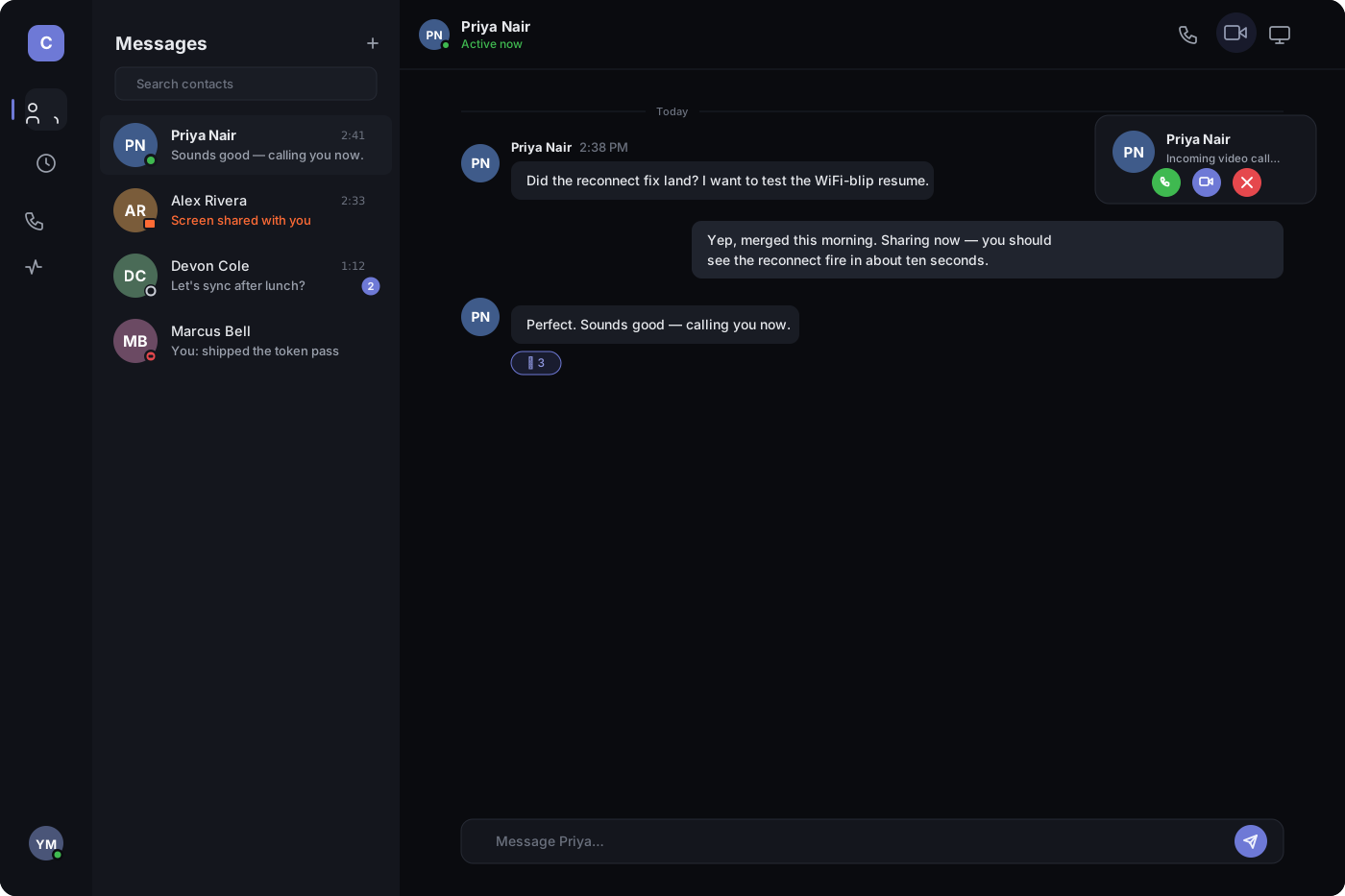
Contacts · Presence · Messaging · Calls · Screen share & control · Rust · Tauri · Iroh/QUIC

The Casual RAS contacts-first desktop app: a navigation rail, a contact list with presence dots, an open conversation with a call and share-screen action in the top bar, and an incoming video call.
One app — contacts, presence, messages, calls, and screen share.

See it working

The two-machine flow works today

Share a connection ticket, approve the viewer, and they see your screen — with your cursor guiding them. No account, no server in the middle.
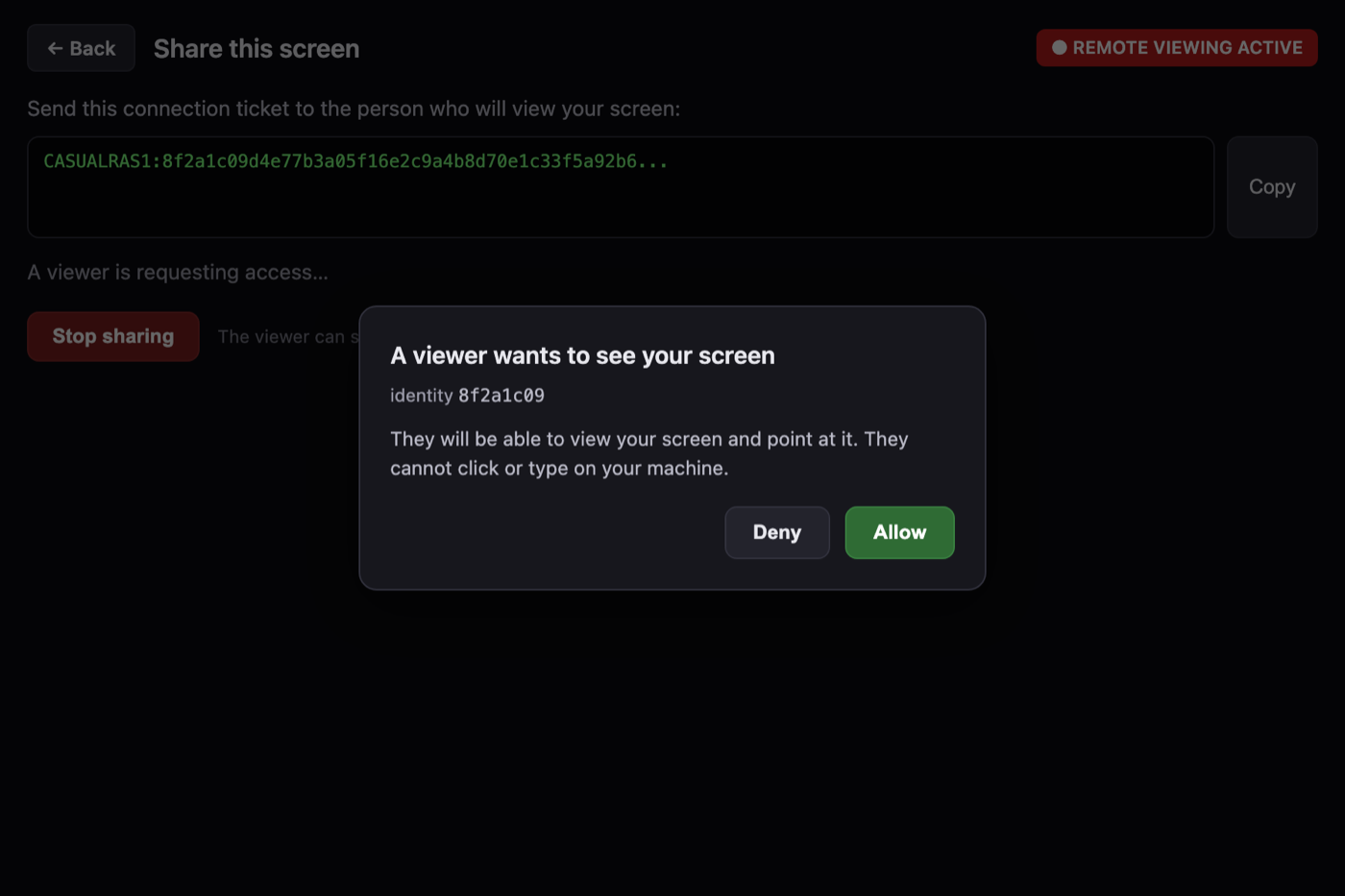
The share screen showing a connection ticket and a consent prompt: a viewer with identity 8f2a1c09 wants to see your screen, with Deny and Allow buttons, and a red REMOTE VIEWING ACTIVE indicator.
No pixels leave the machine until the local user clicks Allow.
Host · shares screen Viewer · points here direct P2P (QUIC) encrypted relay ↔ fallback when no direct path
Direct peer-to-peer first; encrypted relay only if a direct path isn’t available.

Why embed it

A remote-access engine, not a product you send users to

Your users stay inside your product, under your brand and support workflow — no redirect to a third-party remote-desktop app.

Under your brand

White-label by design. Your UI, your flow, your support workflow — Casual RAS is the engine underneath.

Consent-based sessions

The local user approves every session before any pixels are sent, and can stop it at any moment.

No application backend

Direct peer-to-peer connections for the MVP, with an encrypted relay fallback. No server of yours in the path.

Built to embed

A shared Rust core with clean seams; the SDK boundary (C ABI + Node.js) is drawn around the proven crates.

Built for

Where embedded remote access fits

SaaS in-app support

Let support agents see a customer’s screen without a screen-share tool switch.

Enterprise IT & MSPs

Managed-service and internal-IT support with consent and a clear stop control.

Regulated & healthcare

Local, explicit consent on every session for privacy-sensitive workflows.

Device & field support

Guide a user through their own device with a visible remote pointer.

Collaborative software

Multiple visible pointers for pairing, review and walkthroughs (roadmap).

What’s inside

A complete remote-access engine, hardened surface by surface

Media, remote control, data channels, security, and transport — all implemented in a shared Rust core. Six security-critical surfaces have passed independent adversarial multi-agent review.
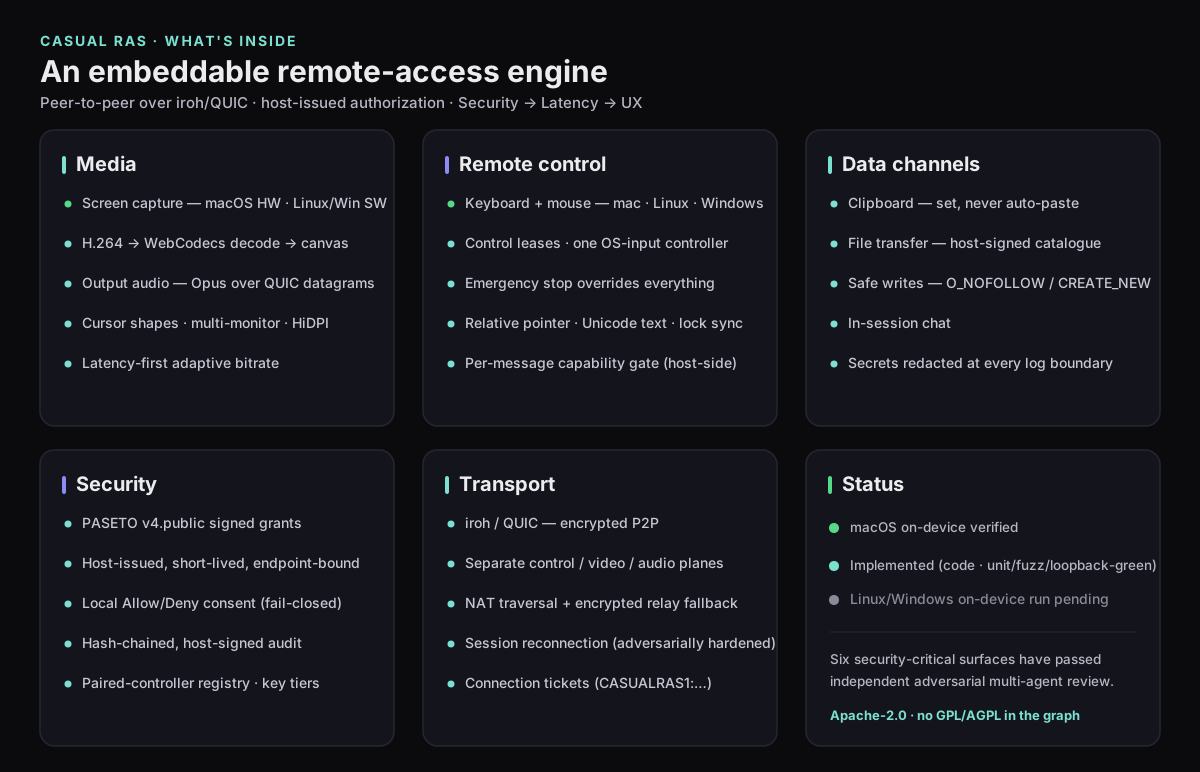
Feature map. Media: screen capture (macOS hardware, Linux/Windows software), H.264 to WebCodecs, Opus output audio, cursor shapes, multi-monitor, adaptive bitrate. Remote control: keyboard and mouse on macOS, Linux and Windows, control leases, emergency stop, per-message capability gate. Data channels: clipboard set-never-paste, signed-catalogue file transfer, in-session chat. Security: PASETO v4 signed grants, host-issued and endpoint-bound, local consent, hash-chained signed audit, paired-controller registry. Transport: iroh/QUIC encrypted peer-to-peer, separate control, video and audio planes, NAT traversal with relay fallback, hardened session reconnection.

Full feature set

A complete session, not just a video feed

Beyond viewing, a live session carries in-session chat, clipboard sharing, file transfer and output audio — each opted into by the machine’s owner, each with an honest, always-visible disclosure. The UI illustrations below represent the shipping app.
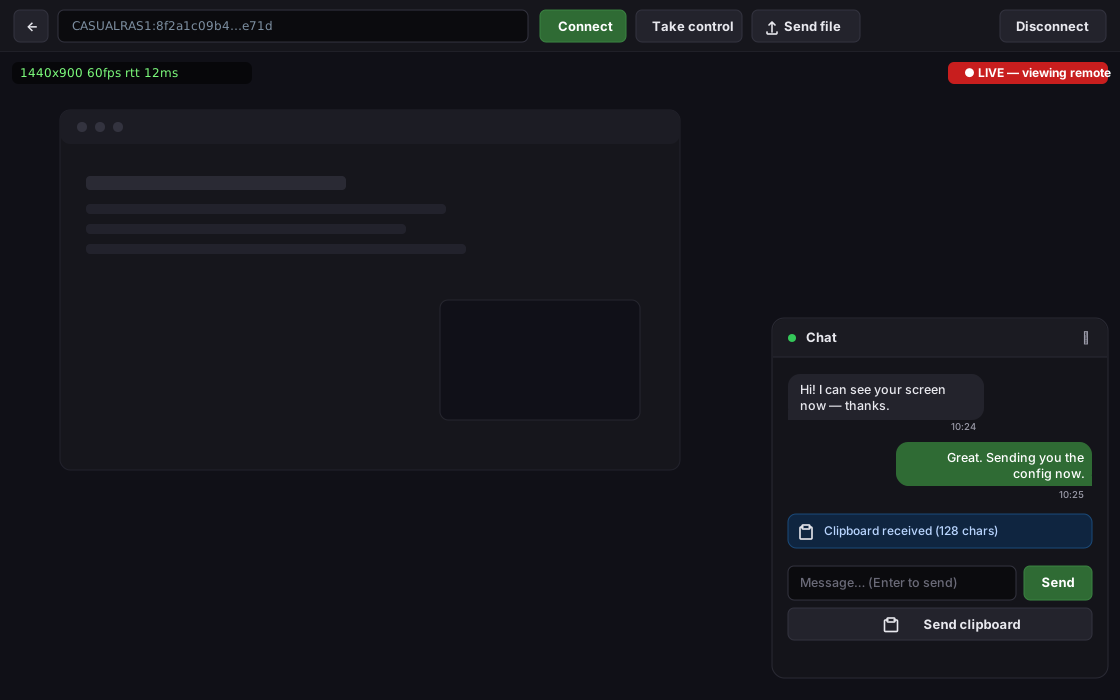
Representative illustration of the Connect (viewer) window with the collapsible in-session chat panel open in the corner: two chat bubbles, a message input with a Send button, a Send-clipboard button, and a blue notice reading Clipboard received.
Chat & clipboard. A collapsible session chat with a one-click “Send clipboard” — the receiver only sets the clipboard, never auto-pastes.
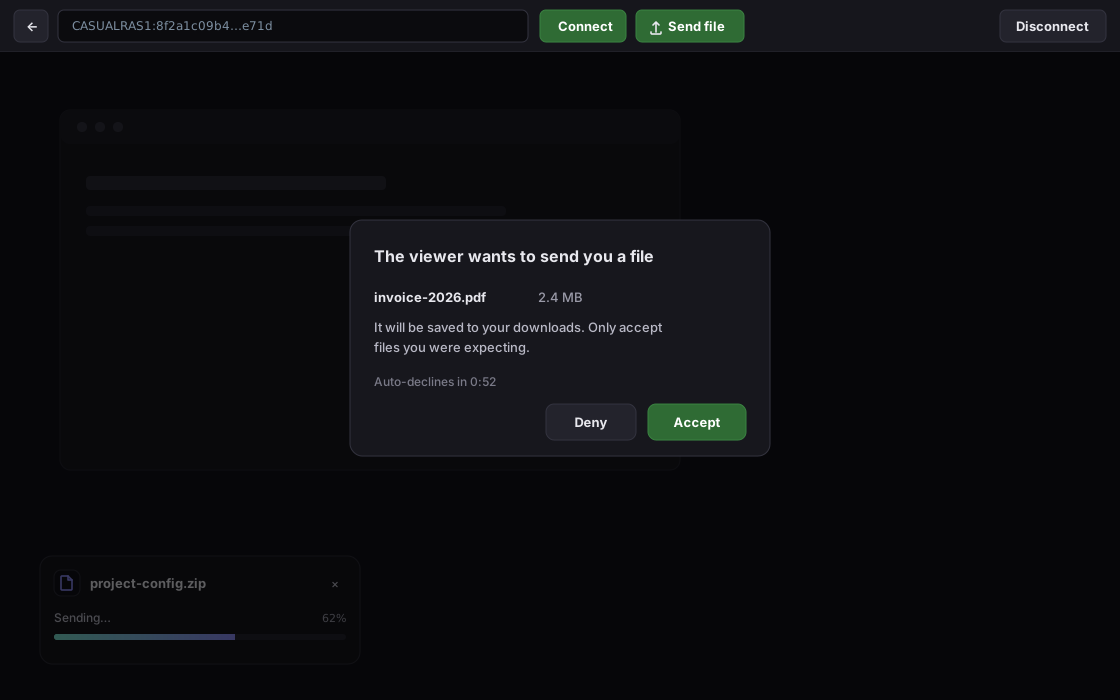
Representative illustration of file transfer: the sender's floating progress card shows a filename, a Sending state, 62 percent and a progress bar, while the receiver's centered Accept or Deny modal names the incoming file and its size and warns to only accept expected files.
File transfer. A signed-catalogue push into a host-chosen folder — the receiver accepts each file by name and size; no browse-anywhere, no controller-supplied paths.
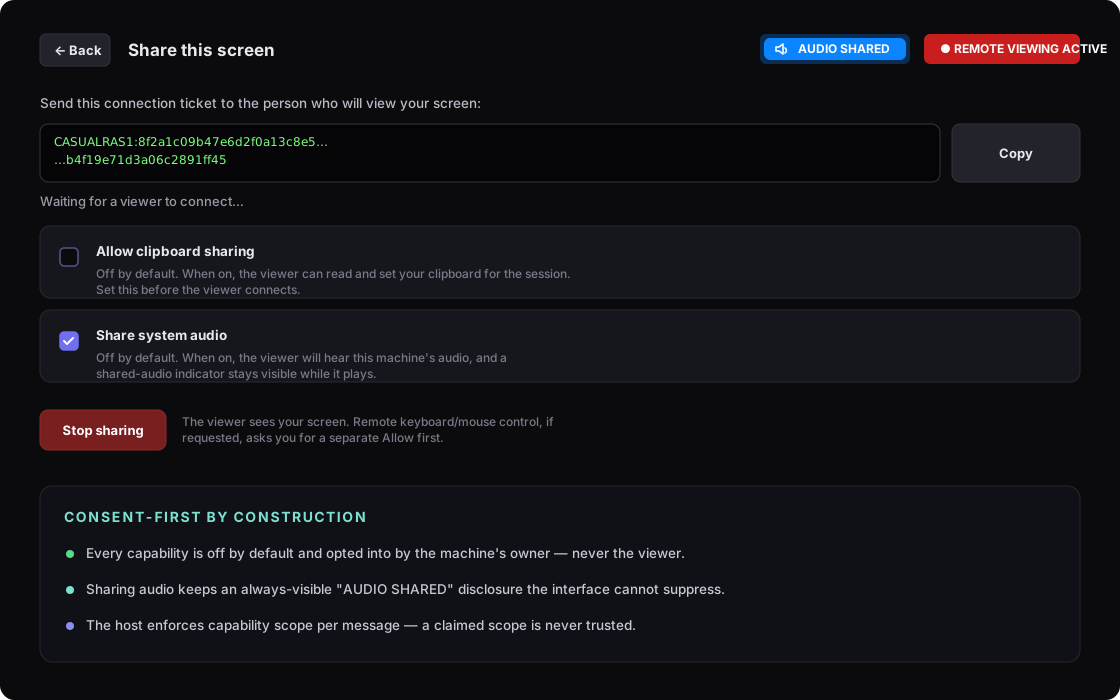
Representative illustration of the Share (host) screen: a connection ticket, a blue AUDIO SHARED indicator, and two off-by-default opt-in toggles — Allow clipboard sharing (off) and Share system audio (on) — with a consent-first summary noting every capability is off by default, audio stays visibly disclosed, and the host enforces capability scope per message.
Output audio & consent-first security. The owner opts into clipboard and system audio per session; sharing audio keeps an always-visible “AUDIO SHARED” disclosure the interface can’t suppress.

These are representative UI illustrations, faithful to the app’s real design — real screenshots ship with the first release.

Platform support

Where it runs today

One app, both roles. Viewing works everywhere; sharing is macOS-first while the other capture backends are built.

macOSShare + View
LinuxView now · Share next
WindowsView now · Share next
Capability availability
CapabilityStatus
macOS screen sharing Alpha
macOS / Linux / Windows viewing Alpha
Remote visual pointer Alpha
Keyboard & mouse control Implemented — verifying
Linux & Windows sharing Implemented — verifying
Signed grants & capability leases Implemented
Tamper-evident audit Implemented
C ABI & Node.js SDK Planned

Security model

Secure by default, responsive under load, honest in the interface

Our engineering priorities, in order: security first, responsiveness second, interface richness third. When they conflict, the higher one wins.

Authorization at the host

Encryption secures the pipe; permission is decided by the host, not the transport. A viewer requests — it never self-authorizes.

Responsive under load

A stalled video never freezes the viewer’s own pointer or the stop control. Latency beats interface richness by design.

Honest by construction

Active viewing is always visible and the stop control is always present. The product build cannot even link a “skip consent” path.

Read the full invariants & dependency policy →

Roadmap

Where we are, and what’s next

Completed

Foundations & validation

The full design, the shared Rust core, and validation of the low-latency video path and macOS capture/encode.

Current alpha

Two-machine app: share, connect, point

One app that shares or views over real peer-to-peer connections, with a connection-ticket flow, real local consent, and a remote pointer.

Next

Linux & Windows sharing · signed authorization

Screen-sharing backends for Linux and Windows, then signed grants and fine-grained capability leases.

Later

SDK, audit & hardening

The embeddable SDK (C ABI + Node.js), tamper-evident audit, an on-device fraud-friction subsystem, and signed release builds.

Get it

Build the alpha

Open source under Apache-2.0. Build from source today; tagged installers publish to GitHub Releases.

Build from source

git clone https://github.com/CasualOffice/RASystem
cd RASystem/app/src-tauri
cargo run

Opens the app — choose Share this screen or Connect to a screen. macOS first-run asks for Screen Recording permission.

Prebuilt installers

Tagged releases build macOS .dmg, Linux .AppImage/.deb, and Windows installers via CI. Builds are unsigned in the alpha (right-click → Open on macOS).

View releases

Technical details

Invariants, dependencies & FAQ

Non-negotiable security invariants
  • The local user is the final owner. A viewer requests; it never self-authorizes.
  • Emergency stop overrides everything — grant, lease, in-flight state — within the target time.
  • Consent is honest and unspoofable. Active viewing is always visible; branding may not hide it.
  • Transport encryption is necessary, not sufficient. Authorization is enforced by the host.
  • Secrets never touch logs — keys, tokens, clipboard, typed text or screen pixels.
  • Capability scope is enforced host-side, per message — never trust a client’s claimed scope (implemented).
Dependency & license policy
Apache-2.0 across the whole repository, including a patent grant, so it is safe to embed in proprietary applications. Copyleft licenses (GPL/LGPL/AGPL/SSPL) are rejected and blocked at build time by an automated license gate; permissive licenses (MIT/Apache/BSD/ISC/Zlib/MPL-2.0) are allowed.
Is it a contacts app or an embeddable SDK?
Both, from one core. The app is contacts-first: a real contact list with presence, messaging, calls, and screen share/control — so a "can you see my screen?" moment doesn't mean launching a second product. The same proven Rust core is white-label and embeddable, so a vendor can drop the remote-access engine into their own app under their own brand. App-first, SDK-extracted-later.
Does it do voice/video calls?
It's being built. The security foundation has landed and is fully tested off-device: the pure call state machine, the two deny-by-default microphone/camera capabilities, the signed out-of-session "ring" signal, and the in-session call control messages. What's left is the OS microphone/camera capture and the call UI — no on-device calling yet. Calls are consent-gated and, like all media here, live-only and never recorded.
How do contacts and presence work?
You add a contact by their invite code, then see when they're online and message them — signed and contacts-only, so a stranger or blocked peer is dropped before anything is read. A contact asking to view your screen is a request that raises the same local consent card; it never self-authorizes. This is wired to the live backend; two-machine on-device verification is pending.
Does it need a server?
No application backend is required for the MVP. Direct peer-to-peer connections are preferred; when a direct path is unavailable, an encrypted relay carries the traffic. There is no central application server in the middle.
Can a viewer control my keyboard and mouse?
Yes — full keyboard and mouse control is implemented on all three platforms, always behind explicit local consent and a per-message capability check the host enforces (the controller never self-authorizes). It is in on-device verification; the independently verified experience today is view-only plus a visual remote pointer.
Which platforms can share vs. view?
Viewing works on macOS, Linux and Windows. Sharing is verified on macOS; Linux (PipeWire) and Windows (Windows.Graphics.Capture) sharing backends are implemented and in on-device verification.
Is there an SDK yet?
Not yet. The approach is app-first: prove the roles in a real reference app, then draw the SDK boundary (C ABI + Node.js) around the proven crates. An SDK surface can’t be validated without a real consumer.